Lost in the Library
A UX research journey to improve digital wayfinding
Timeline: 6 Weeks
My Role: UX Research
Client: IU Library
Challenge
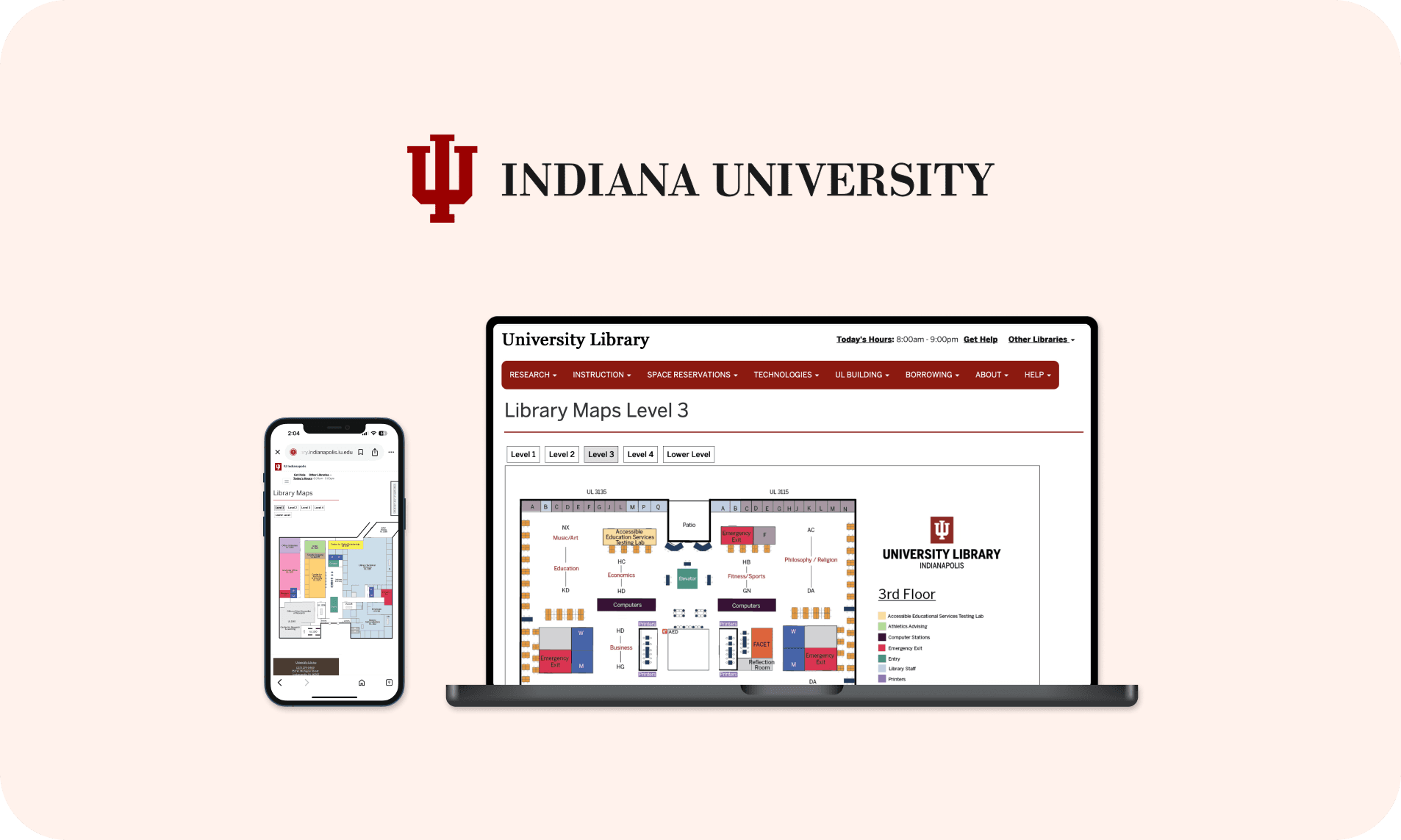
The library map system was supposed to help users get around the building. But after talking to students and staff, it became clear that the current system was not working. People kept asking the help desk for directions. Many relied on memory, hallway signs, or just trial-and-error.
This wasn’t just a minor inconvenience. It impacted how easily someone could access services, attend events, or explore lesser-known parts of the library.
Goal
This project aimed to systematically evaluate the usability challenges and provide evidence-based recommendations for improvement.
What I set out to learn
The research began with defining clear objectives: to evaluate how well users could navigate the space using the digital maps, and to pinpoint moments where the experience broke down.

How I designed the test
I recruited 10 participants (a mix of undergrad and grad students) who were either new to the building or had limited prior experience with the map. My goal was to see how they'd actually use the system if they walked in without guidance.
5 Graduate students
5 Undergraduates
I used task-based testing with think-aloud protocol, where participants talked through their thoughts as they tried to:
Find specific rooms or services
Interpret color-codes and signage
Navigate from one spot to another
This helped me catch moments of confusion, hesitation, and workarounds in real time.
After the tasks, I gathered qualitative feedback through:
→
System Usability Scale (SUS) questionnaire to get a quick sense of perceived usability
→
Short follow-up interviews to dig into what they liked, what didn’t work, and what they’d change
The shocking results
The Library Map website received an average SUS score of 58.5, which falls significantly below the benchmark of 70, pointing to poor usability.
Statistical analysis revealed a 97.89% probability that the true usability score is below 70, providing strong evidence of usability issues.
So, what went wrong?
Discoverability
6 out of 10
couldn’t even locate the map on the website
Mobile Friction
8 out of 10
struggled with the mobile experience
Visual Overload
7 out of 10
found the design too dense and confusing

What needs to change
Based on SUS ratings and user interviews, the following key changes are needed to improve clarity, usability, and how quickly users can interpret the map.
Make it visible
Move map to main navigation and add prominent visual cues so users can actually find it.
Smart search integration
Add search functionality within the map. Auto-suggest popular locations as users type.
Simplify design
Reduce visual clutter and improve information hierarchy for clearer navigation.
Visual improvements
Use color-coding by floor with consistent legend and add visual breadcrumbs showing current location.
Interactive hotspots
Show real-time availability for study rooms and include clickable targets with pop-up details.
Why this matters
Student gains
Saves time. Can quickly locate key spots like study rooms, printers, or restrooms without asking.
Less cognitive load. Easier-to-interpret maps mean more mental energy for actual tasks.
Feel more confident navigating the building independently.
Library gains
Staff benefits. Fewer interruptions from lost or confused students asking for directions.
Better utilization. Resources discovered and used more effectively.
Leads to fewer complaints and a more welcoming environment.
What I learned
I realized users weren’t just confused, they felt lost and frustrated. It showed me how bad UX can really damage trust, especially in places that blend physical and digital experiences, like a library.
On mobile, people expect faster responses, easier gestures, and cleaner visuals. That made me realise that designing “mobile-first” has to mean more than just shrinking layouts.
Additionally, using the SUS score helped me validate what users were feeling. It turned subjective pain points into data-backed arguments for change.